Most maintenance problems in small operations are not caused by a lack of knowledge. Teams know which machines need servicing, which parts wear out fastest, and roughly how often things fail. The problem is that this knowledge lives in people, not in a system.
A preventive maintenance schedule changes that. It converts informal know-how into a repeatable process.
What Is a Preventive Maintenance Schedule?
A preventive maintenance schedule is a structured plan that defines what maintenance tasks need to happen, on which equipment, how often, and who is responsible. It replaces reactive repairs with planned interventions carried out before failures occur.
Done well, a preventive schedule reduces unplanned downtime, extends equipment life, and gives operations managers visibility over what has been done and what is coming up.
Why Google Sheets Works as a Starting Point
Google Sheets is already used in most SME operations for planning, tracking, and reporting. It is collaborative, accessible across devices, and requires no specialist software to set up.
For preventive maintenance, a Google Sheets-based schedule offers a practical entry point. It can be built quickly, shared across the team, and updated without a technical onboarding process. The limitation is that a raw spreadsheet has no built-in logic for reminders, status tracking, or historical logging. That is where structure and the right tool layer matter.
What Your Preventive Maintenance Schedule Needs
Before building anything, decide what the schedule must contain. A functional preventive maintenance schedule in Google Sheets should include:
Equipment list. Every piece of equipment that requires scheduled maintenance. Include an asset ID or reference code, location, and equipment type.
Task definitions. For each asset, what maintenance tasks apply. Oil changes, filter replacements, calibrations, safety checks, and cleaning cycles all belong here.
Frequency. How often each task should occur. Daily, weekly, monthly, quarterly, and annual intervals are common. Some tasks are usage-based rather than time-based (every 500 hours of operation, for example).
Responsible person or team. Who carries out the task. Leaving this blank creates ambiguity that turns scheduled tasks into skipped tasks.
Scheduled date and completion date. When the task is due and when it was actually done. The gap between these two dates is your first signal of schedule adherence.
Status field. A simple indicator: scheduled, in progress, completed, or overdue. This makes the sheet useful at a glance rather than requiring someone to read every row.
Notes or observations. Space for the technician to log what was found during the intervention. This feeds your maintenance history over time.
How to Structure the Schedule in Google Sheets
A common mistake is building everything into one flat table. This works initially but becomes hard to navigate as the equipment list grows.
A more practical structure separates concerns across sheets within the same file:
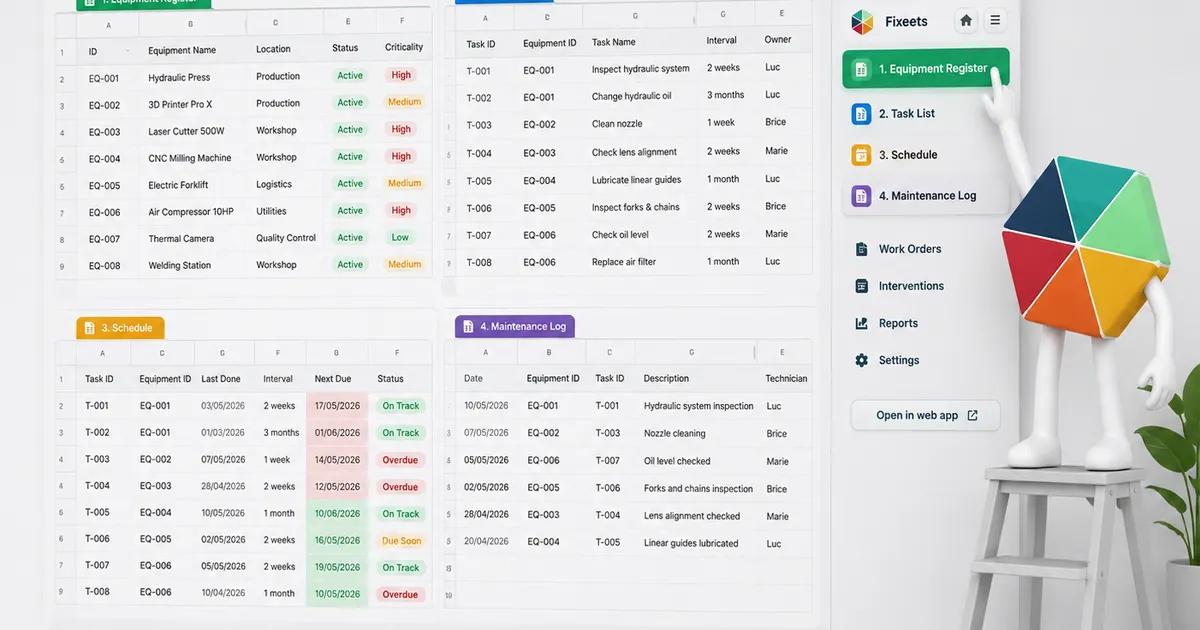
Sheet 1 - Asset Register. One row per asset. Asset ID, name, location, category, and any relevant specs. This is the master reference.
Sheet 2 - Task Library. One row per task type. Task name, default frequency, estimated duration, and skill level required. Referencing this sheet keeps task naming consistent across the schedule.
Sheet 3 - Maintenance Schedule. The active calendar view. Each row is a scheduled intervention: asset ID, task, assigned technician, scheduled date, completion date, status, and notes. This is where work gets tracked.
Sheet 4 - Maintenance Log. A running history of completed interventions. Each time a task is marked complete in Sheet 3, the record moves or is duplicated here. Over time this becomes your equipment history.
This separation makes it easier to filter, report, and maintain without one sheet becoming unmanageable.
Setting Up Frequency Logic
The most useful thing you can do in a Google Sheets maintenance schedule is make frequency visible and actionable.
For time-based tasks, use a calculated next-due date. If the last service date is in column F and the interval is in column G (in days), the next due date is simply =F2+G2. Conditional formatting can then highlight overdue rows automatically.
For usage-based tasks, you need a separate column tracking current usage (hours, cycles, or units). The calculation becomes: last service reading plus interval equals next service threshold. When current usage approaches that threshold, the row should flag.
Neither of these approaches sends a reminder on its own. For that, you either need someone checking the sheet regularly or a tool that adds alert logic on top of the structure.
Common Gaps in Spreadsheet-Based Schedules
A well-structured Google Sheets maintenance schedule is a significant step forward from an informal approach. But raw spreadsheets have predictable failure points:
No automatic reminders. Unless someone opens the file and checks it, overdue tasks stay invisible. Schedules that depend on manual review tend to drift.
No intervention history without extra steps. Marking a task complete in the schedule does not automatically create a log entry. Teams often skip the logging step, which means the maintenance history never builds.
No mobile-friendly input. Technicians completing tasks in the field often cannot easily update a spreadsheet from a phone. The result is that completion data gets entered later, if at all, and the schedule lags reality.
Version conflicts in shared files. Multiple users editing the same sheet simultaneously can create data integrity problems, especially when status and dates are being updated at the same time.
For a closer look at what these gaps cost in practice and how to recover from reactive patterns, see how to reduce unplanned downtime in small operations.
Moving From a Static Sheet to a Structured Maintenance System
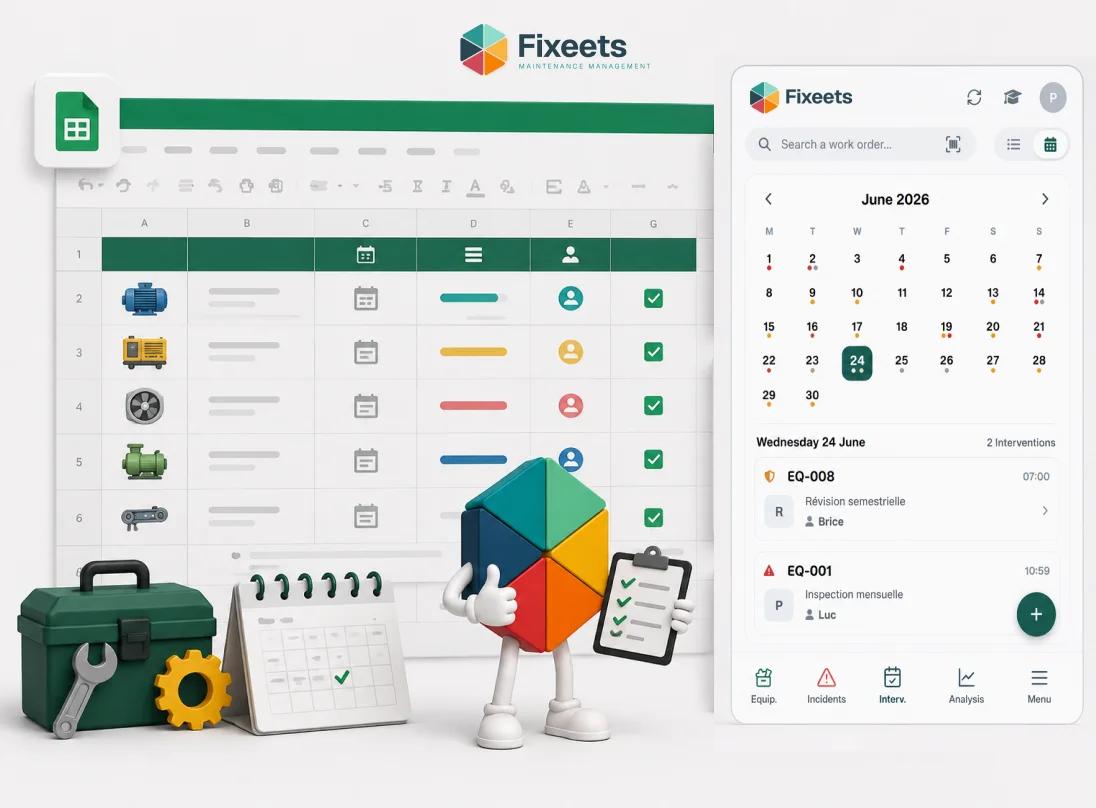
Fixeets Maintenance Management runs inside Google Sheets and addresses the gaps above without replacing the spreadsheet interface your team already uses.
The core additions are:
- Structured work orders tied to specific assets and tasks
- Preventive maintenance schedules with built-in recurrence logic
- An automatically maintained intervention log that builds over time
- Access from multiple devices, including mobile, without editing a shared spreadsheet directly
The data stays in your Google Drive. There is no external platform to log into or migrate data toward. The structure sits on top of Google Sheets, not instead of it.
For teams already tracking maintenance informally in a spreadsheet, this represents a practical next step rather than a wholesale change of tools. If you are weighing a spreadsheet-only approach against dedicated maintenance software, CMMS vs spreadsheets: which makes sense for growing teams covers that comparison directly.
To see how the maintenance module works in practice, visit the Fixeets maintenance management page.
Building the Schedule: Practical Starting Steps
If you are starting from scratch, keep the initial scope narrow.
Step 1. List your five to ten most critical assets. Not everything at once. Start with equipment where failure creates the most disruption or cost.
Step 2. Define one to three maintenance tasks per asset. The most important recurring tasks, not an exhaustive list.
Step 3. Set the frequency for each task. Be realistic. A schedule that sets monthly tasks for a team that can only realistically manage quarterly ones will fail immediately.
Step 4. Assign a responsible person to each task. One name, not a team name.
Step 5. Set the first scheduled date for each task. Not a future date that feels safe. The date the task is actually due based on the last known service.
Step 6. Establish a weekly review habit. Someone checks the schedule every Monday. Overdue tasks get escalated. This is the discipline that makes the system work.
Once this core is running reliably, expand to more assets and more task types.
Connecting Preventive Maintenance to KPIs
A preventive maintenance schedule is also the foundation for the metrics that help operations managers make better decisions. Schedule adherence rate, mean time between failures, and planned versus reactive maintenance ratio all depend on consistent task logging.
If you are tracking maintenance KPIs or want to build toward them, the article on maintenance management KPIs every operations manager should track covers which metrics matter and how to measure them from a Google Sheets-based system.
Preventive scheduling is one part of the broader practice. Our complete guide to maintenance management covers the rest, from asset records to the KPIs that show whether the schedule is working.
Key Takeaways
- A preventive maintenance schedule converts informal maintenance knowledge into a repeatable, trackable process.
- A functional Google Sheets schedule needs an asset list, task definitions, frequencies, assigned owners, scheduled dates, completion dates, status fields, and notes.
- Separating the asset register, task library, active schedule, and maintenance log into different sheets keeps the system manageable as it grows.
- Frequency logic can be built with simple date formulas and conditional formatting, but raw spreadsheets do not send reminders or auto-log history.
- Fixeets adds work orders, recurrence logic, and automatic intervention logging directly on top of Google Sheets without replacing the interface teams already use.
- Start with five to ten critical assets and one to three tasks each. Get the habit running before expanding scope.
Frequently Asked Questions
What is a preventive maintenance schedule? A preventive maintenance schedule is a structured plan that defines which maintenance tasks need to happen, on which assets, how often, and who is responsible. It replaces unplanned reactive repairs with timed or usage-based interventions carried out before failures occur.
Can I build a preventive maintenance schedule in Google Sheets? Yes. Google Sheets is a practical starting point. You can structure an asset register, task list, schedule, and log across separate sheets within the same file. The main limitations are the absence of automatic reminders and the lack of a built-in intervention log.
What should a maintenance schedule include? At minimum: asset name and ID, task description, frequency, assigned technician, scheduled date, completion date, status, and notes. These fields give you enough to track adherence and build a maintenance history over time.
How do I track overdue maintenance tasks in Google Sheets? Use a calculated next-due date column combined with conditional formatting. If today's date exceeds the next-due date and status is not marked complete, the row highlights automatically. This requires someone to open the sheet and check it regularly.
What is the difference between preventive and corrective maintenance? Preventive maintenance is planned and carried out before a failure occurs. Corrective maintenance is reactive and happens after a failure. Preventive schedules aim to reduce the frequency and severity of corrective interventions.
How often should preventive maintenance tasks be scheduled? Frequency depends on the asset, its criticality, manufacturer recommendations, and operational context. Common intervals are daily, weekly, monthly, quarterly, and annual. Some tasks are usage-based rather than time-based.
Does Fixeets replace my Google Sheets maintenance schedule? No. Fixeets runs inside Google Sheets and adds structure, work orders, recurrence logic, and automatic logging on top of your existing environment. It does not require migrating to a new platform.
How is Fixeets different from a CMMS? Traditional CMMS platforms are standalone systems with their own databases and interfaces. Fixeets adds maintenance management capabilities directly inside Google Sheets and Google Workspace, which reduces the adoption barrier for teams already working in that environment.
What is the first step to building a preventive maintenance schedule? Start with your five to ten most critical assets. Define the one to three most important recurring tasks for each. Set realistic frequencies, assign a responsible person, and establish a weekly review habit. Expand scope once the core is running reliably.
Can multiple technicians update the maintenance schedule at the same time? In a raw Google Sheets file, simultaneous editing can create conflicts. Fixeets manages this by structuring how work orders and completions are recorded, reducing the risk of data integrity issues in shared maintenance workflows.