Equipment rental software keeps track of what you own, who has it, when it comes back and what condition it comes back in. For a small rental business, the job is narrower than most product pages suggest: know what is free on a given date, stop the same unit from going out twice, record each handover and return, follow the deposit and the payment, and see which equipment actually earns its place in the yard.
Most rental businesses don't start with software. They start with a whiteboard, a paper diary or a spreadsheet, and that works for a while. The questions below are the ones worth asking before you pick a tool, whether it's a dedicated rental platform, a bigger spreadsheet, or something in between.
What Rental Software Does That a Spreadsheet Does Badly
A spreadsheet is good at lists. Equipment rental is not really a list problem, it's a calendar problem with quantities in it.
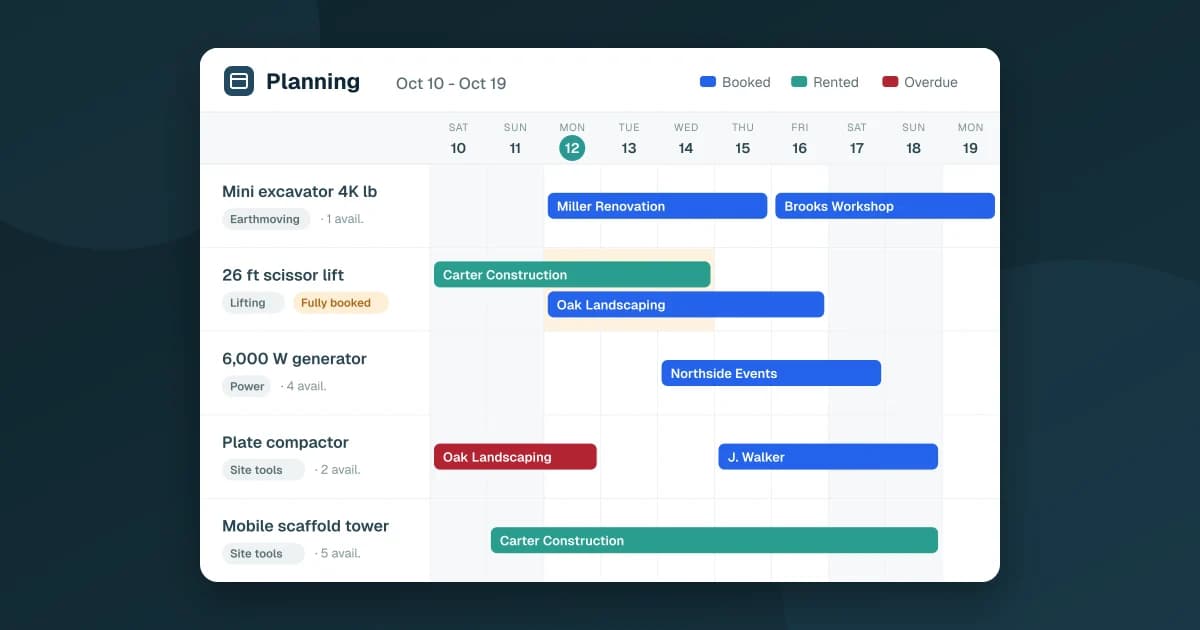
Take a 26 ft scissor lift you own three of. On Monday, two are out with a renovation contractor until Thursday. A landscaper calls for one from Wednesday to Friday. Is there one free? In a spreadsheet, someone has to scan every row that mentions the lift, check every date range against Wednesday, Thursday and Friday, and count. Do that ten times a day across forty pieces of equipment and mistakes stop being rare.
That is the core of rental software: it answers "how many are free on these dates?" for you, every time, before you promise anything. Everything else (agreements, deposits, reports) sits on top of that answer.
Availability: See What Is Free and Stop Double Bookings
Good availability tracking has three parts:
- A quantity per piece of equipment. You rarely own one of everything. The software should know you have four generators, not just "generator."
- A check at booking time. When you pick the dates and the quantity, the tool should tell you right away if there aren't enough units, not after the customer has hung up.
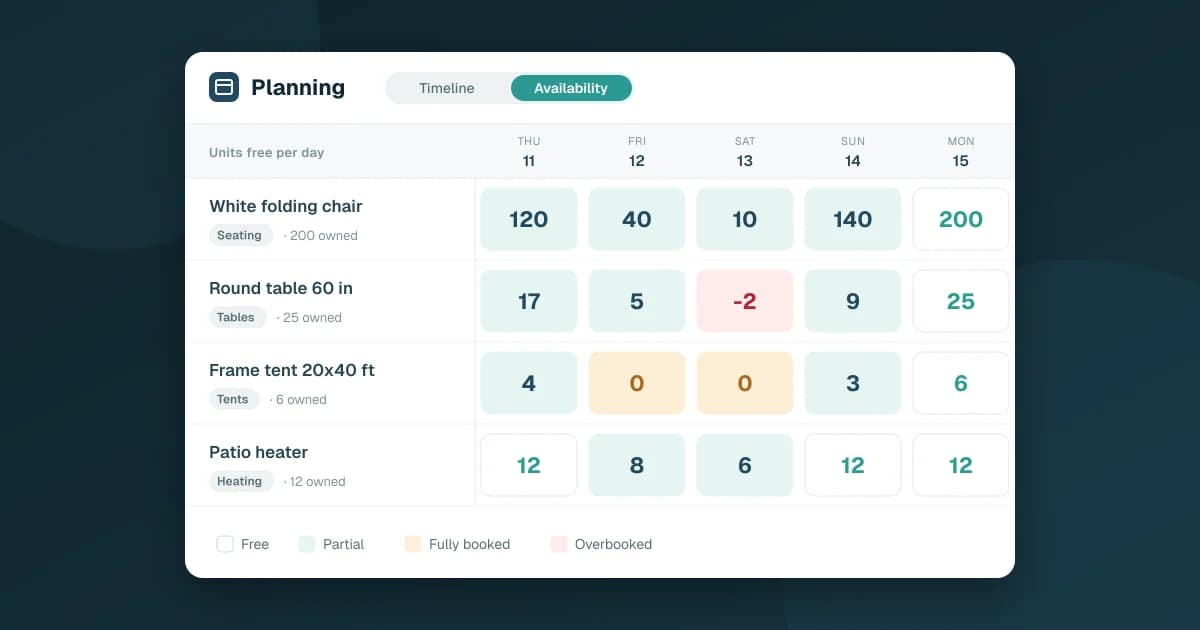
- A planning view. One row per piece of equipment, one column per day, with each rental drawn as a bar. You should see at a glance what goes out today, what comes back today and which days are fully booked.
If most of what you rent is counted in dozens (chairs, tables, tents), availability works differently: party rental inventory without double bookings covers that case.
Two details matter more than they look. First, a quote or a tentative booking shouldn't block equipment until the customer confirms, otherwise your planning fills up with maybes. Second, a late return has to keep the equipment unavailable until it's actually back in the yard. A rental that was due back yesterday is still a rental, and the next customer's booking depends on it.
Handover, Return, Condition and Late Returns
The moment equipment leaves and the moment it comes back are where money is won or lost.
At handover, you want a record of what went out, in what quantity, and in what condition. At return, the same: what came back, and whether it came back damaged. Without that, a dispute about a dented compactor plate comes down to memory against memory.
Look for these in any tool you consider:
- Partial returns. A contractor rents five scaffold towers and brings back three on Friday, two on Monday. The rental should stay open for the two that are still out.
- Condition at start and on return. A simple scale (new, very good, good, fair, damaged) is enough. What matters is that it's recorded on both ends.
- Overdue flags. Rentals past their end date should stand out on their own, without someone checking dates by hand.
Agreement, Deposit and Payment
Every rental needs a paper trail the customer has seen. In practice that means a rental agreement with your company details, the customer, the equipment, the period, the amount, the deposit and your terms, signed before the equipment leaves.
Rental software should generate that agreement from the rental itself, so nothing is retyped, and keep the signed copy attached to the rental.
Then there are two statuses most spreadsheets mix up:
- Payment: pending, deposit paid, paid.
- Deposit: received, refunded, or withheld when something comes back damaged or doesn't come back at all.
Keeping them separate is what lets you answer "who still owes us money?" and "whose deposit do we still hold?" without reading every row.
The Numbers That Tell You If the Fleet Pays Off
Once rentals are recorded properly, the reports come almost for free. These are the ones that change decisions in a small rental business:
- Utilization rate: how many days each piece of equipment was out, compared with the days it could have been. A generator out 70% of the time and one out 10% of the time are not the same asset.
- Idle equipment: what was never rented in the period. That's the first list to look at before buying anything new.
- Revenue by equipment and by customer: who and what really brings money in.
- On-time returns and overdue rentals: which customers and which equipment keep coming back late.
- Seasonality: which months are busy, so you know when to add units and when to schedule servicing.
Servicing is its own job, by the way. If your fleet also needs preventive maintenance, the article on how to track equipment maintenance in Google Sheets covers that side, and a maintenance history log is where damage noted at return should end up.
Three Options for a Small Rental Business
There isn't one right answer. There are three common setups, each with a real tradeoff.
1. Keep the spreadsheet
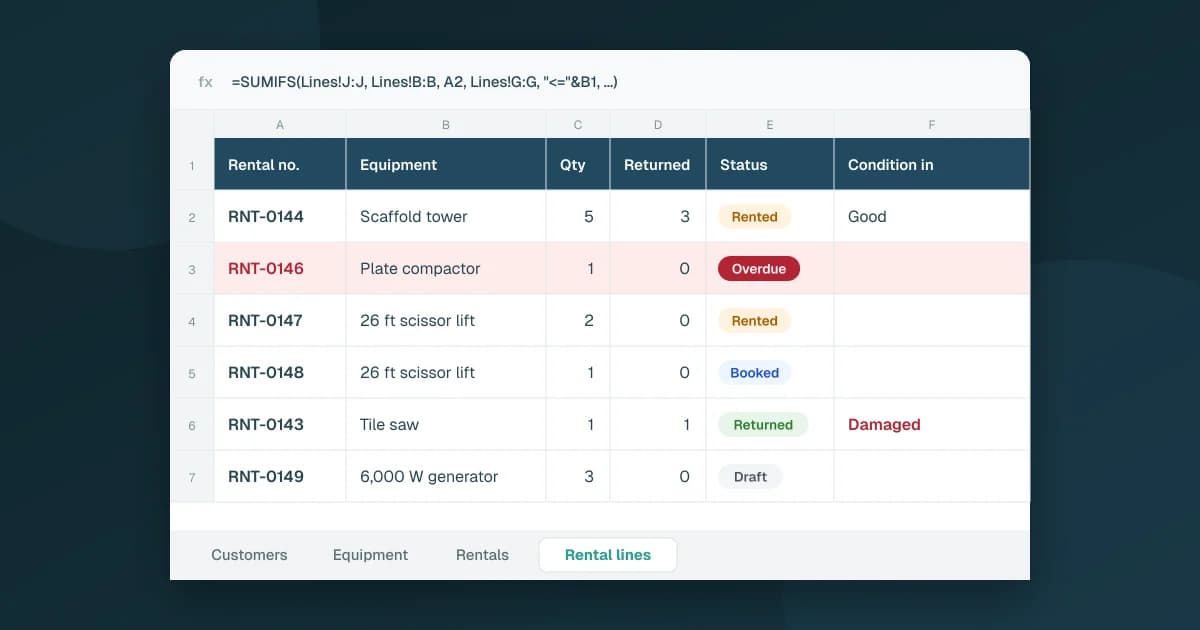
Free and flexible, and fine when you have a handful of items and one person taking bookings. It breaks when two people book at the same time, when quantities get involved, or when nobody can say which deposits are still held. If you go this way, at least give it real structure: separate tabs for equipment, customers and rentals, one row per rented item, and fixed status values instead of free text.
For the exact tabs, columns and an availability formula, see how to set up a rental tracking spreadsheet in Google Sheets.
2. A dedicated rental platform
These tools often go further than you need: online booking storefronts, card payments, delivery routing, customer portals. If your customers book online or you run delivery trucks every day, that depth is the point. If you mostly take bookings by phone and email, it can be a lot of software to learn, and your data lives in someone else's system.
3. A rental app built on Google Sheets
The middle option: the structure and checks of rental software, with your data staying in a Google Sheet in your own Drive. This is the approach behind Fixeets equipment rental management.
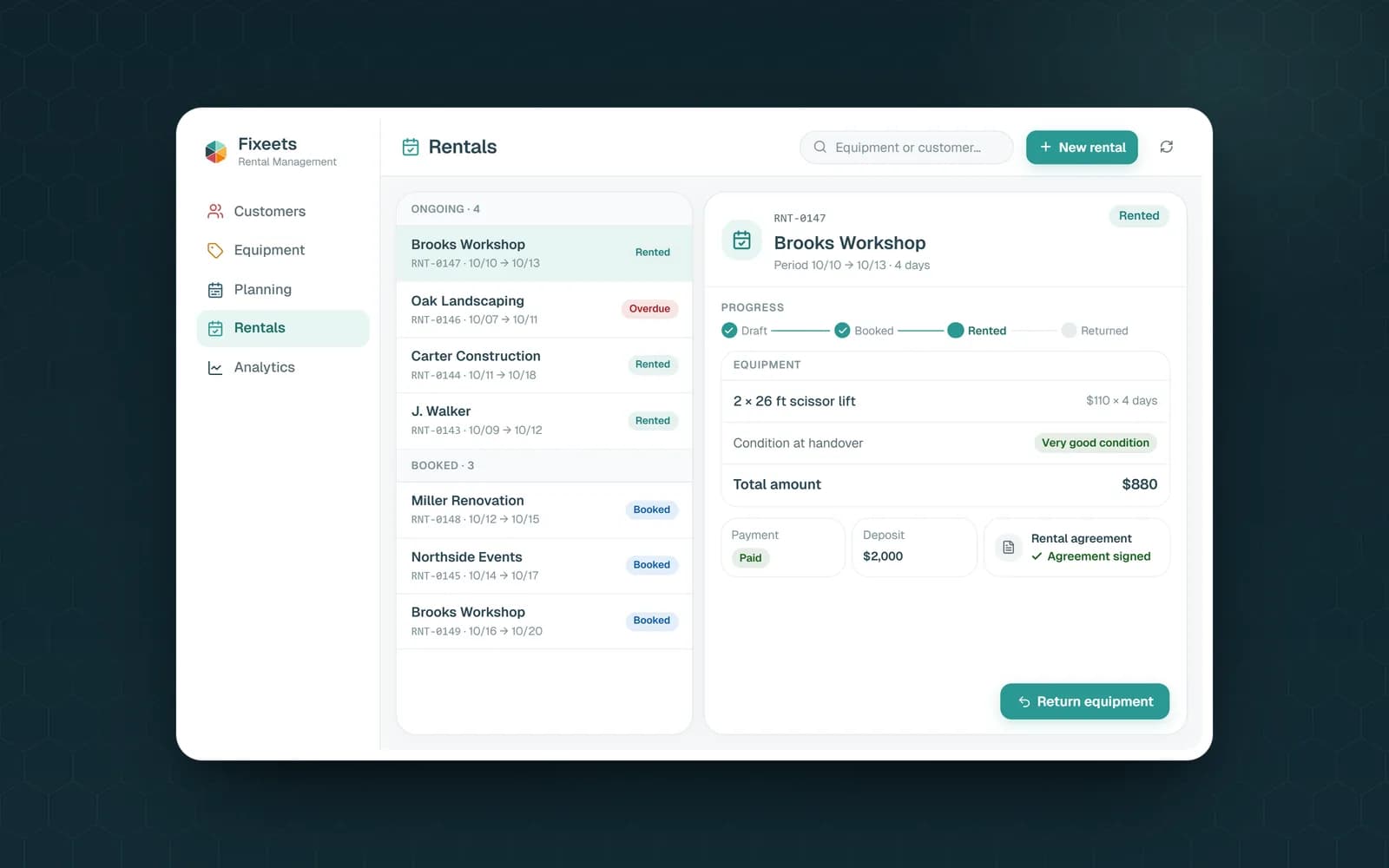
In Fixeets Rental you record equipment (quantity available for rent, rate per day, unit deposit, category) and customers, then create rentals by picking the customer, the dates and the equipment. Fixeets checks the quantity available on those dates and tells you if it isn't enough. Rentals move through draft, booked, rented, returned or cancelled. Drafts don't block equipment, and a late return keeps it unavailable until it's back.
From a rental, you generate the agreement as a PDF saved to your Drive, with your logo, clauses and general rental terms, then attach the signed copy. Handover and return record the condition on both ends, returns can be partial, and payment and deposit each have their own status. The planning shows a timeline and a calendar, departures and returns of the day, and flags days that are fully booked or overbooked. The analytics cover utilization, idle equipment, revenue, outstanding amounts, on-time returns and seasonality. Barcode or QR code labels for your equipment are an option.
It works from the Google Sheets side panel or from the web app on a computer or in a phone's browser.
To be clear about scope: Fixeets Rental doesn't take online bookings or online payments from your customers, and it doesn't plan deliveries. If your business depends on those, a dedicated platform is the better fit. Plans are on the pricing page.
Key Takeaways
- Equipment rental software exists to answer one question reliably: how many units are free on these dates?
- Quantities matter: track how many of each item you own, not just the item
- Drafts shouldn't block equipment, and late returns should keep it unavailable until it's back
- Record condition at handover and at return, and allow partial returns
- Keep payment and deposit as two separate statuses
- Utilization, idle equipment and on-time returns are the reports that change buying decisions
- The three realistic options for a small business are a structured spreadsheet, a dedicated rental platform, or a rental app built on Google Sheets
FAQ
What is equipment rental software? It's software that tracks rentable equipment, customers and rentals over time: what is available on a date, what is out, what is due back, and what condition it returns in. Most tools also generate rental agreements and report on fleet utilization.
How does rental software prevent double bookings? By checking the quantity already booked or rented for the requested dates before confirming a new rental. Booked and ongoing rentals block their equipment for the whole period; tentative drafts should not.
Can I manage equipment rentals in Google Sheets? Yes, with a clear structure: tabs for equipment, customers and rentals, one row per rented item, and fixed statuses. The weak point is availability, which a plain sheet can't check for you at booking time.
What reports matter most for a small rental business? Utilization rate per piece of equipment, idle equipment, revenue by equipment and customer, overdue rentals and on-time returns. Together they show what to buy, what to sell and which customers to follow up.
Does Fixeets Rental take online bookings or payments? No. You create rentals yourself from the app or the Google Sheets side panel, and record payment and deposit statuses there. Customers don't book or pay online through Fixeets.
Where is my rental data stored with Fixeets? In a Google Sheet in your own Google Drive. Rental agreements are saved as PDFs in your Drive as well.